The short answer
Yes, Starlink works on boats, barges and offshore sites, but the plan matters as much as the dish. Starlink’s Global Priority plan is the one for the open ocean, Local Priority covers one country’s land and its inland and territorial waters, and Residential works only at a fixed registered address. Use while under way needs Starlink’s in-motion approval in Nigeria, which is not confirmed. On a work boat alongside a jetty, we measured 103 Mbps.
Which Starlink plan works on a boat?
These are Starlink’s worldwide plan names since 2025. Nigerian press calls Starlink’s business plan “Business (Priority)”, and whether Starlink’s Nigerian site now uses the Local and Global Priority names is not confirmed. Most new customers in Nigeria are on Priority plans in any case, because Residential is not open to new customers in most locations.
| Plan | Where it can be used | In-motion limit |
|---|---|---|
| Residential | Only at the registered service address | Not permitted |
| Roam | Within its coverage area; Roam Unlimited cannot be used on the open ocean | Capped at 100 mph since March 2026, subject to local restrictions |
| Local Priority | One country’s land, plus its inland and territorial waters | Capped at 100 mph (87 knots); needs in-motion approval in that country |
| Global Priority | Worldwide, including the open ocean | Capped at 100 mph (87 knots) |
On every plan, in-motion use also depends on the two conditions in Starlink’s terms below: a kit or mount designated for it, and Starlink’s approval in the country of use.
Three rules matter for anyone on the water:
- In-motion approval. Starlink’s standard terms (the version we could read; Nigeria’s may differ) ban using a kit on a moving vehicle or vessel unless Starlink has designated that kit model or mount for in-motion use and holds all required in-motion approvals in the country of use. Unauthorised use voids the kit’s limited warranty and can lead to termination. The NCC has a licence route for terminals on ships, but we have found no public confirmation that Starlink holds it. Confirm with your Starlink account, or ask us to check, that in-motion use is allowed on your plan in Nigeria before relying on it.
- Priority data. On the Nigerian accounts we sell and manage, once a Priority plan’s priority data is used up, the service carries on with unlimited standard data at lower network priority. Size the allowance for the whole crew, so the vessel stays on faster priority data for the month.
- Leaving Nigerian waters. Starlink’s standard terms say that if a Local Priority kit spends more than 30 days in another country, Starlink may ask you to move the registered address or upgrade to Global Priority.
For a moored barge or a boat that stays in one place, the in-motion question does not arise, but the location rules still do. Our guides to Starlink Roam in Nigeria and Starlink for business explain the plans in more depth.
Which Starlink kit is best for a boat?
| Performance | Standard (Gen 3) | Starlink Mini | |
|---|---|---|---|
| Field of view | 140° | 110° | 110° |
| Water rating | IP69K with cables fitted (IP68 without) | IP67 | IP67 with the DC cable and Starlink Plug fitted |
| Wind | Survivable at 280 km/h+ | Operational at 96 km/h+ | Operational at 96 km/h+ |
| Average power | 75-100 W | 75-100 W | 25-40 W |
| DC power | Advanced Power Supply takes 12-56 V DC | Needs Starlink’s DC-DC Power Supply or an inverter | 12-48 V DC input |
| Router | None included; use your own | Included (indoor) | Built in |
| Warranty (Starlink) | 24 or 36 months, depending on generation | 12 months | 12 months |
- Performance is Starlink’s kit built for motion and extreme weather. Choose it for vessels that go offshore, work in rough water or move a lot.
- Standard (Gen 3) can be a sensible, cheaper choice for a barge, houseboat or work boat that spends most of its time moored or alongside, fixed firmly and tethered. Whether Starlink supports the Standard for in-motion use on current plans is not confirmed.
- Starlink Mini suits small boats and short trips: low power, Wi-Fi built in (up to 128 devices and about 112 m²), and easy to stow. Independent testers report it can overheat in strong direct sun, which matters on an open deck.
Mounting Starlink on boats and barges
A boat mount has to survive vibration, spray and the occasional knock, and still give the dish a clear sky. Keep it clear of masts, crane booms, exhausts, radar and other antennas, and tether it.
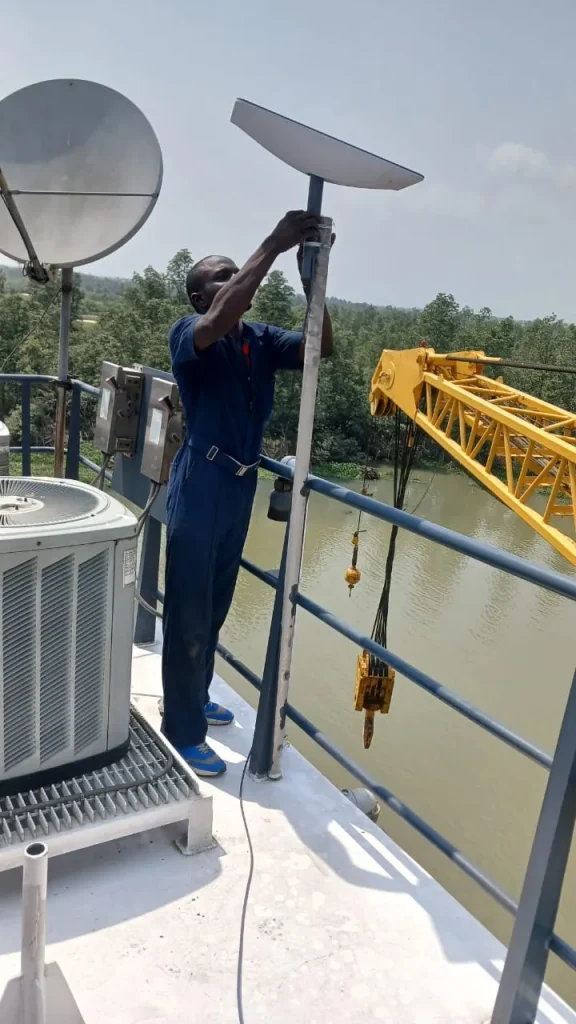
On a working crane barge, we clamped a pole to the upper-deck railing beside the barge’s existing VSAT dish, clear of the crane boom, and carried Wi-Fi into the cabins and the mess room.
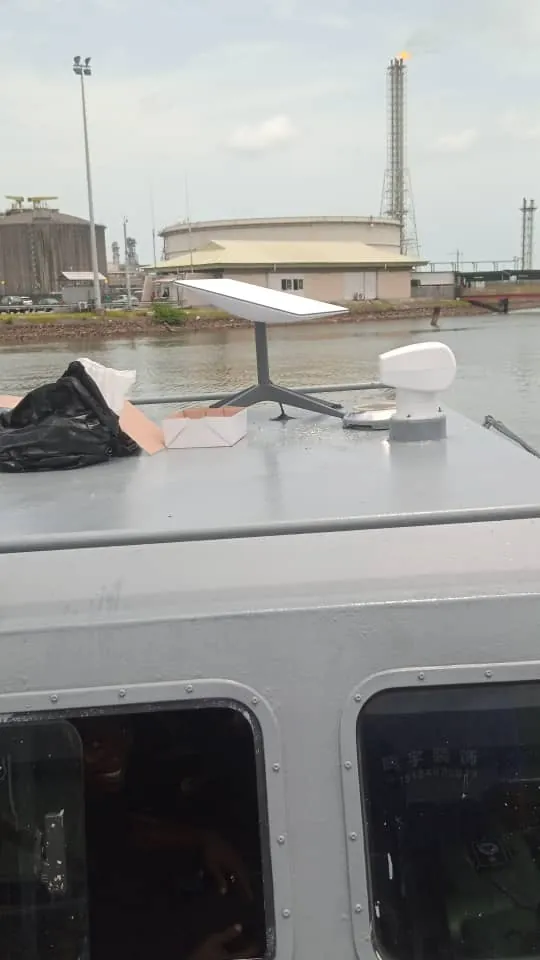
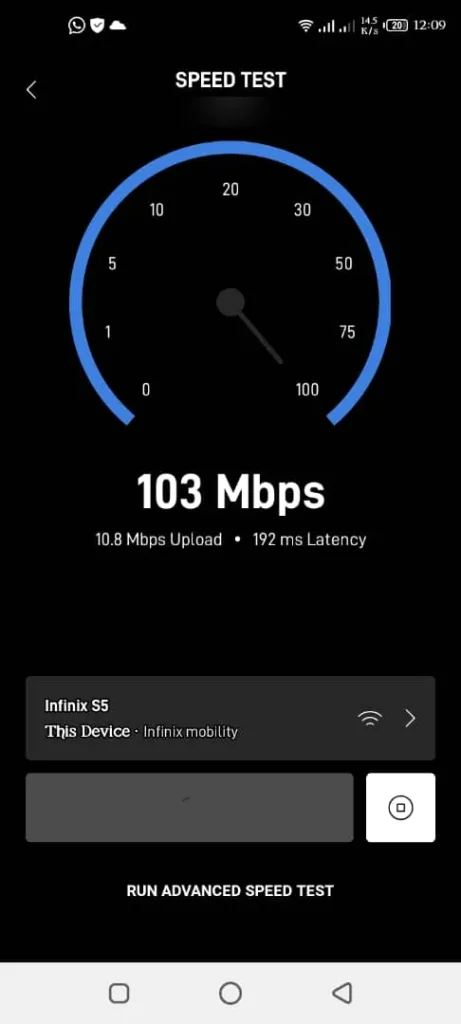
On a smaller work boat, we bolted the dish to the cabin roof and fitted the router inside the wheelhouse, where it stays dry. Alongside the jetty, the Starlink app measured 103 Mbps download and 10.8 Mbps upload at handover. That is one moment in time, not a promise; speeds at sea vary.
Poles, brackets and fixings on land are covered in our guide to Starlink mounts; most of the same rules apply on deck.
Saltwater, vibration and sun
- Fixings: use stainless steel or hot-dip galvanised bolts and clamps. Ordinary steel rusts fast near salt water.
- Vibration: engines and waves loosen nuts over time. Use lock nuts or thread-lock, and check the mount regularly.
- Connectors: push every plug fully home so its seal works, keep the Mini’s Starlink Plug fitted when its Ethernet port is unused, and leave a drip loop where the cable enters the cabin.
- Router: keep it inside the wheelhouse or a cabin. Starlink’s routers are indoor devices.
- Salt: rinse salt off the dish with fresh water from time to time.
Powering Starlink on board
Starlink quotes an average of 75-100 W for the Standard (Gen 3) dish. Left on around the clock, a Standard kit uses about 110 W × 24 h ≈ 2.6 kWh a day on our working figure of 110 W: the top of Starlink’s range plus 10 W we allow for the router, whose draw Starlink does not publish. It can run from the vessel’s inverter or generator through its normal power supply, or from DC through Starlink’s DC-DC Power Supply. The Performance kit’s Advanced Power Supply takes 12-56 V DC directly, so it needs no inverter. The Mini takes 12-48 V DC. Marine generators can swing in voltage, so use surge protection or run Starlink from an inverter. Any DC wiring on board should be fused and done by a marine electrician. For 12 V wiring, car-style adapters and battery runtimes, see our guide to Starlink on 12 V and power banks.
Wi-Fi across cabins and decks
Steel bulkheads and container cabins block Wi-Fi, so one router on the bridge usually will not reach the crew quarters. Put a router or access point in each space people actually use, and link them back by cable where you can. Starlink says a wired link between Starlink routers is best. On the crane barge, routers in the cabins and mess room put the Wi-Fi where the crew spend their time.
For larger vessels, a third-party router with business-grade access points gives more control. Since March 2026, Starlink’s app also offers an “Auto” Wi-Fi mode meant for vehicles and boats, where the Wi-Fi only comes on once Starlink has an internet connection. We design and fit these networks through our Starlink business service.
Starlink on yachts and cruise ships
On a private yacht, the same rules apply: Global Priority for the open ocean, a firm mount and a tether. A Mini you bring onto a cruise ship would need a clear view of the sky on deck, a plan and kit that Starlink allows for ocean and in-motion use, and the ship’s permission. Inside a steel ship, it will not see the sky. Check the cruise line’s rules before you pack it.
How much is Starlink for boats in Nigeria?
The monthly cost depends on the plan, and the plan depends on where the vessel works: Global Priority for the open ocean, or Local Priority for one country’s inland and territorial waters, each with a data allowance sized for the crew. Our Enterprise plans, which are Starlink Priority plans, cost ₦120,000 a month for 1 TB of priority data, ₦210,000 for 2 TB and ₦600,000 for 6 TB at our current prices. Kits, installation, mounts and on-board networking are priced separately. See our current Starlink prices, or send us the vessel details and we will confirm which plan suits where it works, with a quote. Prices change with the exchange rate and Starlink’s own pricing.
Getting a vessel connected
Our installers have fitted Starlink to a crane barge and a work boat, and we handle the plan, the mount and the on-board Wi-Fi together. Send us the vessel type and where it operates, and we will advise on kit and plan. WhatsApp us or call 0802 859 5303, 24 hours a day.
Starlink for boats FAQs
Can Starlink work in the middle of the ocean?
Yes, on the Global Priority plan, and with a kit Starlink has designated for in-motion use if the vessel is under way. Starlink says latency can be 100 ms or more in remote places such as oceans, against 25-60 ms on land.
Will the Starlink Mini work on a cruise ship?
Only on deck with a clear sky, on a plan that allows ocean and in-motion use, and with the ship’s permission. Inside the ship, no.
Can I use my Residential plan on a boat?
Not on a boat that moves. Residential works only at its registered service address, and Starlink does not permit it in motion.
Does Starlink work on rivers and creeks in Nigeria?
Under Starlink’s plan rules, Local Priority covers a country’s inland and territorial waters, so Nigeria’s rivers and creeks fall within it, subject to the in-motion rules above. In narrow creeks, tall mangroves can block part of the sky, so a high mount helps.
How fast is Starlink on a boat?
Starlink’s standard terms give a typical download range of 45-280 Mbps, though independent Ookla data for early 2026 put Nigeria’s median download below 50 Mbps. Our work boat measured 103 Mbps down and 10.8 Mbps up alongside the jetty.